Microsoft .NET Framework 2.0 SP1 (x64)- A Legacy Essential
Learn about the Microsoft .NET Framework 2.0 SP1 (x64), a critical runtime for older enterprise applications on 64-bit Windows. Discover its features, benefits, and importance.
Introduction: The Foundation for Legacy Applications
In the world of Windows software, the .NET Framework is a foundational component. It provides the runtime environment that countless applications depend on. While newer versions exist, the .NET Framework 2.0 Service Pack 1 (x64) remains a critical piece of infrastructure, especially for organizations running legacy enterprise software. This article explores what this specific version is, why it’s still essential, and what it offers.
What is the .NET Framework 2.0 SP1 (x64)?
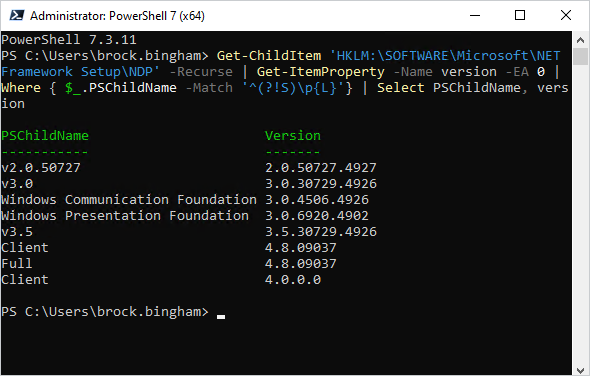
The Microsoft .NET Framework 2.0 Service Pack 1 (SP1) is a redistributable package that installs the .NET Framework runtime and associated files required to run 64-bit applications developed for this specific version. It is a cumulative update that includes critical bug fixes, performance improvements, and security patches released after the initial version 2.0 launch.
The “x64” designation indicates that this version is specifically designed for 64-bit processors, ensuring that memory management and processing power are utilized efficiently. This package is essential for running older business tools and creative software suites that were built on the 2.0 architecture.
Why Is It Still Important?
Backward Compatibility
A key reason for its ongoing relevance is backward compatibility. While Microsoft has released newer versions of the .NET Framework (like 3.5, 4.x, and the modern cross-platform .NET Core), they are not always perfectly backward compatible with applications built on older versions. This means that specialized business tools and software developed years ago may refuse to initialize or throw cryptic errors without the correct framework version installed.
A Bridge to Newer Frameworks
This specific package also acts as a vital bridge. It provides the groundwork and support for .NET Framework 3.0 and 3.5, which many applications still rely on today. Installing this version is often a prerequisite for moving toward these newer, yet still legacy, frameworks.
Security and Stability
While the framework is old, the SP1 update significantly improves system stability by addressing numerous customer-reported bugs and performance bottlenecks. It also includes important security improvements that protect your system from vulnerabilities discovered after the initial release.
Key Features of the Package
- Essential for Legacy Apps: Provides the necessary runtime for a vast number of older business applications.
- x64 Support: Specifically optimized for 64-bit Windows systems.
- Critical Bug Fixes: Integrates cumulative roll-up updates that fix performance bottlenecks and common bugs.
- Security Patches: Includes security updates to address vulnerabilities.
- Multilingual Support: Supports a wide variety of global languages.
Installation and Considerations
The Installation Process
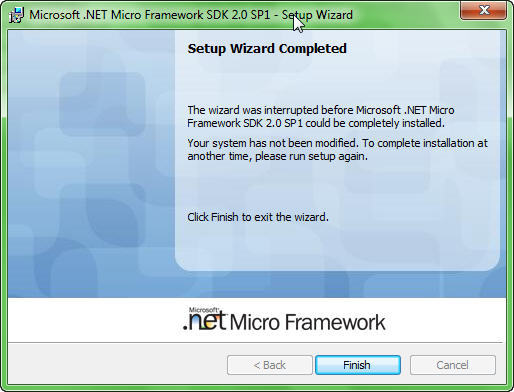
The installation process can be slow. It is a legacy installer and may feel dated compared to the modern installers found in Windows 11. Users may find the interface clunky.
Potential Conflicts
A significant drawback is that manual troubleshooting is often required if a version conflict occurs with pre-installed system files. This can be frustrating for non-technical users who are simply looking for a quick fix to get their software running. It is a mandatory download for anyone managing legacy software on 64-bit machines.
Frequently Asked Questions (FAQs)
1. What is the difference between the .NET Framework 2.0 and 2.0 SP1?
Service Pack 1 is a cumulative update for version 2.0. It includes all the patches, bug fixes, and security updates released after the initial launch, providing a more stable and secure version of the framework.
2. Is the .NET Framework 2.0 SP1 still supported by Microsoft?
While it may not receive active mainstream support, it is still a necessary component for many legacy applications. Microsoft may still provide security updates through extended support.
3. Do I need this if I have .NET Framework 4.x installed?
Yes, you may still need it. Newer versions of the .NET Framework do not provide perfect backward compatibility with applications built on version 2.0. They are installed side-by-side, and an older application will specifically look for its required version.
4. Why is the x64 version important?
The x64 version is designed for 64-bit processors. Using the correct version ensures that the application can access more memory and take full advantage of your system’s hardware capabilities.
5. What should I do if I get a version conflict error during installation?
Version conflicts can occur if system files are already in use. A system restart often resolves the issue. For more complex conflicts, you may need to seek specific troubleshooting steps for the error you are encountering.
Conclusion: An Essential Piece of the Legacy Puzzle
The Microsoft .NET Framework 2.0 SP1 (x64) is a testament to the long life of enterprise software. While its interface and installer show its age, its importance cannot be overstated. It is a mandatory installation for anyone running older, 64-bit applications that were built on this version. It provides the essential stability, security, and compatibility needed to keep critical legacy systems operational in a modern digital landscape. For IT professionals and users managing such systems, this package remains an indispensable tool.



