Microsoft Outlook Security Manager – Disable Outlook Security Warnings with One Line of Code
Eliminate “A Program Is Trying to Access Outlook” Popups in Your Applications
If you have ever developed a Microsoft Outlook add-in or an application that automates Outlook tasks, you are almost certainly familiar with the dreaded security warnings. Messages like “A program is trying to access e-mail addresses you have stored in Outlook” or “A program is trying to send an e-mail message on your behalf” are a notorious hurdle for developers . These alerts are a vital security feature from Microsoft, designed to protect users from malware and unauthorized access . However, for legitimate developers creating professional tools, these constant pop-ups can become a significant roadblock, interrupting workflows and creating a poor user experience. Outlook Security Manager was designed to solve this exact problem. It is a programming tool that provides a simple, reliable, and code-based solution to bypass these Outlook security warnings. This article provides a comprehensive overview of Outlook Security Manager, perfect for developers, IT professionals, and tech enthusiasts looking to understand how to streamline their Outlook integration projects.
What is Outlook Security Manager?
Outlook Security Manager is a specialized programming tool developed by Add-in Express in partnership with MAPILab . Unlike end-user security products, it is a developer component designed to be used within the code of add-ins and applications that interact with Microsoft Outlook. Its primary function is to programmatically disable Outlook’s security warnings . The tool achieves this not through “hacks” or modifying Outlook, but by acting as a legitimate in-process COM object that handles the internal security events of Outlook, effectively suppressing the alerts .
Outlook Security Manager is renowned for its simplicity. It typically requires just a single line of code to disable the security prompts, making it an incredibly efficient solution for developers . This simplicity, combined with robust support for various development platforms, has made it a popular choice for developers worldwide. In fact, one user noted it cut their development time “from several weeks to several days,” enabling features like critical real-time alert systems . It supports all major Outlook versions, ranging from Outlook 2000 to the latest Outlook 2021 and Microsoft 365 desktop apps . The software is available for purchase on a subscription basis, which includes a lifetime developer license, meaning you can continue to use the purchased version even after the subscription ends . Please note that this product has been retired and is no longer available for purchase; this information is provided for reference for existing customers and those using older versions .
Key Features of Outlook Security Manager
Suppress All Major Outlook Security Prompts
The core feature of Outlook Security Manager is its ability to suppress the most common and intrusive security warnings in Outlook. It effectively removes pop-ups like “A program is trying to access e-mail addresses you have stored in Outlook” and “A program is trying to send an e-mail message on your behalf” . It achieves this by providing three key properties for developers to control:
- DisableOOMWarnings: Turns off warnings related to the Outlook Object Model (OOM).
- DisableCDOWarnings: Turns off warnings related to Collaboration Data Objects (CDO).
- DisableSMAPIWarnings: Turns off warnings related to Simple MAPI.
This precise control allows developers to disable security only when and where they need to.
Simple, One-Line Code Integration
Simplicity is one of the most significant advantages of Outlook Security Manager. The process is famously straightforward: you declare the object, set the appropriate property to True, execute your protected code, and then set the property back to False . This approach minimizes complexity and makes it easy to integrate into existing projects. The following examples demonstrate how to use it:
Visual Basic .NET
Dim SecurityManager As New AddinExpress.Outlook.SecurityManager
SecurityManager.DisableOOMWarnings = True
Try
    ' ... any action with protected objects ...
Finally
    SecurityManager.DisableOOMWarnings = False
End Try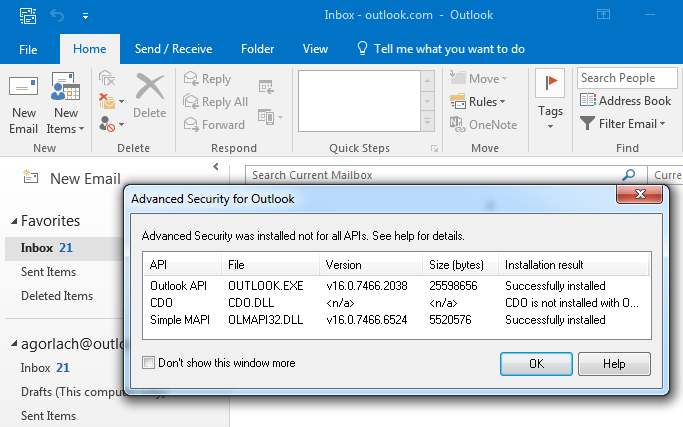
Visual Basic 6 (VBA)
OlSecurityManager.DisableOOMWarnings = True
On Error Goto Finally
    ' ... any action with protected objects ...
Finally:
    OlSecurityManager.DisableOOMWarnings = False
Delphi
OlSecurityManager.DisableOOMWarnings := True;
try
  // ... any action with protected objects ...
finally
  OlSecurityManager.DisableOOMWarnings := False;
end;
Wide Platform, IDE, and Language Support
Outlook Security Manager is available in three editions to support different development environments: .NET, VCL, and ActiveX . This ensures compatibility with a vast array of programming languages and IDEs. It supports:
- .NET: C#, VB.NET, and Visual Studio versions from 2012 to 2022 .
- VCL: Delphi from XE2 to 12 Athens .
- ActiveX: Visual Basic 6, Visual Studio 6, VBA (including Excel and Word), and VBScript .
This extensive support ensures that virtually any developer working with Outlook can utilize the tool.
Reliable and Outlook-Version Compatible
Outlook Security Manager is built to be robust and reliable. It supports an extensive range of Microsoft Outlook versions, covering Outlook 2000, 2002 (XP), 2003, 2007, 2010, 2013, 2016, 2019, 2021, and the Outlook desktop application that is part of Microsoft 365 . The tool has been actively maintained to ensure compatibility with updates and new releases of Microsoft Outlook, as evidenced by numerous update logs addressing specific builds . This active maintenance is crucial for developers who rely on the tool for their applications.
System Requirements
| Component | Requirement |
|---|---|
| Platform/IDE | .NET Framework 4.x & Visual Studio 2012-2022; or Delphi XE2-12 Athens; or ActiveX-compatible environments (VB6, VBA, etc.) |
| Supported Outlook Versions | Microsoft Outlook 2000, 2002 (XP), 2003, 2007, 2010, 2013, 2016, 2019, 2021, and Microsoft 365 (desktop app) |
| Operating System | Windows 11, 10, 8, 7, Vista, Windows Server, and older versions like XP and 2000 |
| RAM | No specific high requirement; operates as a lightweight in-process COM object |
| Hard Disk Space | Negligible; approximately 1-2 MB for the component files |
How to Use Outlook Security Manager
As a developer component, Outlook Security Manager is integrated into your code, not installed like a typical end-user application. Here are the general steps to implement it in your project:
- Download and Install: Acquire the appropriate edition for your development platform (.NET, VCL, or ActiveX) and run the installer to add the necessary references and libraries to your system .
- Add a Reference: In your development environment (e.g., Visual Studio, Delphi), add a reference to the Outlook Security Manager component.
- Declare the Object: Create an instance of the
SecurityManagerclass in your code. - Connect to Outlook: Use the
ConnectTomethod to link the Security Manager to the specificOutlook.Applicationobject your code is using . - Disable Security: Set the appropriate property (
DisableOOMWarnings, etc.) toTruejust before accessing the protected Outlook objects. - Execute Your Code: Run the part of your code that interacts with the protected Outlook features (e.g., reading email addresses, sending emails).
- Re-enable Security: Immediately after your protected code runs, in a
Try...Finallyor error-handling block, set the property back toFalseto re-enable Outlook’s security .
Pros and Cons
| Pros | Cons |
|---|---|
| Simple Integration: Suppresses security warnings with just a line of code . | Product Retired: No longer available for purchase from the developer . |
| Comprehensive Support: Works with .NET, VCL, and ActiveX platforms . | Not a Free Tool: Requires a paid subscription, which may not be viable for all projects . |
| Robust Compatibility: Supports a wide range of Outlook versions, from 2000 to 2021 and Microsoft 365 . | Developer-Centric: Not for end-users; requires programming knowledge to implement. |
| Reliable and Maintained: Actively updated to remain compatible with new Outlook builds . | Security Considerations: Requires careful use to avoid creating security vulnerabilities; you must remember to re-enable security . |
| Professional Solution: Provides a legitimate alternative to “hacks” or “workarounds” . | – |
Practical Use Cases and Benefits
Developing Professional Outlook Add-ins
For developers creating commercial or enterprise add-ins, a smooth user experience is paramount. Outlook Security Manager ensures that legitimate automation features do not trigger confusing or alarming security pop-ups, resulting in a professional, polished, and seamless application.
Automating Business Workflows
Many businesses rely on automated workflows that involve sending emails or processing contacts via Outlook. For example, a CRM system automatically logging emails or an invoicing system sending out statements. Outlook Security Manager allows these essential automation processes to run uninterrupted, boosting productivity and ensuring business continuity. One developer used it for a critical state government project, implementing a cell phone paging solution for irrigation alarms. The tool enabled them to send automatic intrusion alerts via text email instantly, cutting their development time from weeks to just days .
Overcoming Development Roadblocks
For developers, being blocked by security prompts can be incredibly frustrating and time-consuming. Instead of spending days or weeks trying to implement complex workarounds, Outlook Security Manager provides a straightforward, immediate solution, allowing developers to focus on the core functionality of their application rather than fighting Outlook’s security model .
Frequently Asked Questions (FAQ)
1. Is Outlook Security Manager a free tool?
No, Outlook Security Manager is a commercial product that requires a paid subscription . The purchase includes a developer license, technical support, and updates for a specific period .
2. What does “retired” mean for Outlook Security Manager?
The product has been officially retired by the developer and is no longer available for new purchase . This likely means no new versions or updates will be released for future Outlook builds. This information is for reference for existing customers and those using older versions.
3. How does Outlook Security Manager work?
It works as a legitimate in-process COM object that intercepts and handles the internal security events triggered by the Outlook Object Model Guard. It does not modify Outlook or use hacks; it simply tells Outlook that the calling application is safe .
4. Is using Outlook Security Manager safe?
Yes, it is safe when used responsibly. The tool simply suppresses the warnings for legitimate code. However, you must be diligent in turning security back on after your protected code executes to avoid creating a security hole in your application .
5. Can I use Outlook Security Manager with VBA in Excel?
Yes, it is fully compatible with the ActiveX edition, which supports VBA in applications like Excel and Word, as well as Microsoft Office MailMerge functionalities .
6. What types of security warnings does it block?
It blocks many common warnings, including:
- “A program is trying to access e-mail addresses you have stored in Outlook.”
- “A program is trying to send an e-mail message on your behalf.”
- “A program is trying to access your Address book or Contacts.”
7. Is it compatible with the latest Outlook version?
While it supports up to Outlook 2021 and Microsoft 365, its retirement means future compatibility is not guaranteed. Existing users should test it thoroughly with their specific Outlook builds and look for alternatives for long-term projects. The latest update logs mention compatibility with Outlook 2021 and Microsoft 365, showing support for builds up to early 2024 .
Conclusion
Outlook Security Manager has been an invaluable, time-saving tool for developers, providing a simple and reliable method to eliminate the persistent security warnings that hinder Outlook automation. Its ability to work with a single line of code across multiple development platforms has made it a go-to solution for years. While the product has been retired and is no longer available for purchase, understanding its purpose and capabilities is still useful for maintaining existing projects that depend on it . For current users, it remains a functional solution for their current needs, though they may need to plan for alternative strategies for future Outlook updates. Overall, Outlook Security Manager exemplifies how a focused, well-engineered developer tool can solve a common problem, significantly improving development efficiency and user experience.



