eKalappai Review- A Comprehensive Tamil Typing Tool for Windows
Read our in-depth review of eKalappai, the open-source keyboard manager for Windows. Discover its features for typing in Tamil with five supported layouts.
Introduction: Typing in Tamil Made Easy
For Tamil speakers and learners, typing in the Tamil script on a Windows computer can be a challenge. The default operating system options may not offer the flexibility or ease of use that users need. eKalappai is a free, open-source keyboard manager designed to solve this problem. It provides a simple and effective way to type in Tamil, making it an essential tool for anyone who needs to write in the language. This review explores its features and what it offers.
What is eKalappai?
eKalappai is a free, open-source keyboard manager for Windows that is specifically designed for typing in Tamil. It is a lightweight application that sits in your system tray, allowing you to easily switch between different Tamil keyboard layouts and your standard English keyboard. The software is widely used in Tamil-speaking communities and is considered one of the best tools for Tamil typing.
The name “eKalappai” is derived from “Electronic Kalappai,” with “Kalappai” being the Tamil word for “tools” or “weapon,” reflecting its purpose as a practical writing tool.
Key Features of eKalappai
Support for Five Tamil Keyboard Layouts
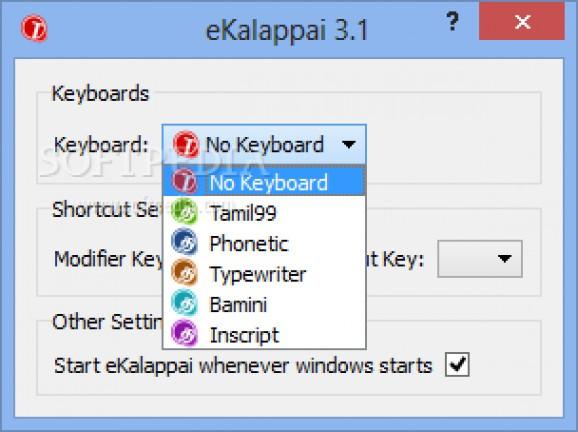
The software’s primary strength is its support for multiple Tamil keyboard layouts, catering to different typing preferences and regional standards.
- Tamil 99: A popular and modern layout designed for efficiency.
- Typewriter (Tamil Typewriter): A layout that mimics the traditional Tamil typewriter.
- Bamini: A widely used layout in Tamil computing.
- Phonetic: A layout where keys correspond to the sounds of Tamil letters.
- Inscript: The Indian government’s standard layout for typing in Indian languages.
Customizable Shortcuts
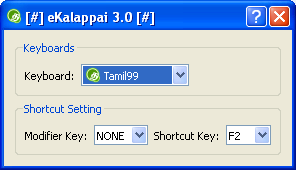
eKalappai allows you to customize keyboard shortcuts for toggling between layouts. This makes it easy to switch between Tamil and English typing without interrupting your workflow.
Open-Source and Free
Being open-source means the software is free to use and its code is publicly available. This ensures transparency and allows the community to contribute to its development.
Scim-Table Format
The software uses the scim-table format for keyboard handling, which is a standard used in Linux environments. This provides a robust and well-tested foundation for its functionality.
User Feedback and Considerations
What Users Like
- Essential for Tamil Typing: Users find it an indispensable tool for typing in Tamil.
- Simple and Effective: It is praised for being straightforward to use and getting the job done.
- Multiple Layouts: The support for five different keyboard layouts is a major advantage.
Limitations
- Niche Focus: The software is primarily focused on Tamil language support. It is not designed for other languages.
Who Is eKalappai For?
- Tamil Speakers and Writers: Anyone who needs to type in Tamil on a Windows computer.
- Students and Academics: For writing assignments, research papers, or notes in Tamil.
- Content Creators: For writing articles, blog posts, or social media content in Tamil.
- Language Learners: For practicing and learning to type in the Tamil script.
Frequently Asked Questions (FAQs)
1. Is eKalappai free to use?
Yes, eKalappai is completely free and open-source software.
2. What are the Tamil keyboard layouts supported by eKalappai?
It supports Tamil 99, Typewriter (Tamil Typewriter), Bamini, Phonetic, and Inscript layouts.
3. Can I switch between Tamil and English typing easily?
Yes, the software provides customizable shortcuts for toggling between Tamil layouts and your standard English keyboard.
4. Is eKalappai available for Mac or Linux?
eKalappai is primarily a Windows application. There are similar tools for other operating systems.
5. What is the scim-table format?
Scim-table is a standard format used for keyboard layouts in Linux environments. eKalappai uses this format, providing a robust foundation for its keyboard handling.
Conclusion: An Essential Tool for Tamil Typing
eKalappai is a practical, effective, and essential tool for anyone who needs to type in Tamil on Windows. Its support for multiple keyboard layouts and customizable shortcuts make it a flexible and efficient solution. While it is a niche tool focused on a single language, it excels in its purpose. For Tamil speakers, writers, and learners, eKalappai is an invaluable addition to their software toolkit.



