Solid PDF/A Express – Professional PDF Archiving
Introduction
In an era where digital documentation dominates business operations, ensuring that your important files remain accessible and intact for years to come is a significant challenge. The PDF/A format has emerged as the gold standard for long-term electronic document archiving, offering a reliable way to preserve files exactly as they were created. Solid PDF/A Express for Windows provides a professional solution for organizations and individuals seeking to convert, create, and validate these archival-quality PDF documents.
This comprehensive guide explores everything you need to know about Solid PDF/A Express—from its core features and system requirements to practical applications and comparisons with other solutions. Whether you’re an office professional, records manager, or small business owner, this article will help you understand how this software can streamline your document archiving workflow.
Understanding PDF/A: The Archival Standard
What is PDF/A?
PDF/A is a specialized version of the Portable Document Format designed specifically for the long-term preservation of electronic documents . Unlike standard PDF files that may rely on external content, fonts, or functionality that could become obsolete, PDF/A ensures that documents remain self-contained and viewable exactly as intended, regardless of future technological changes. Think of it as creating a digital time capsule for your important documents.
Why PDF/A Matters for Long-Term Archiving
Organizations across industries—from government agencies to financial institutions—require document preservation strategies that withstand the test of time. Standard PDF files can lose formatting when fonts become unavailable, break when external links expire, or fail to render properly on future software versions. PDF/A eliminates these risks by embedding all necessary resources within the file itself .
The format adheres to strict ISO standards (ISO 19005), providing a universally accepted method for document preservation that courts, regulatory bodies, and organizations worldwide recognize . For businesses operating in regulated industries, using PDF/A-compliant documents often represents a legal requirement rather than merely a best practice.
Introducing Solid PDF/A Express
What is Solid PDF/A Express?
Solid PDF/A Express is a specialized Windows-based software application designed to facilitate the creation, conversion, and validation of PDF/A documents . Developed by Solid Documents, this tool serves as a comprehensive solution for professionals who need to prepare documents for long-term archiving while maintaining usability and accessibility.
The software supports the full range of PDF/A standards, including PDF/A-1b, PDF/A-2b, PDF/A-2u, PDF/A-3b, and PDF/A-3u, making it compatible with various archival requirements . It offers functionality extending beyond simple conversion, incorporating OCR capabilities, document manipulation features, and robust compliance verification tools.
Key Capabilities at a Glance
The software provides several core functions that make it valuable for document management professionals:
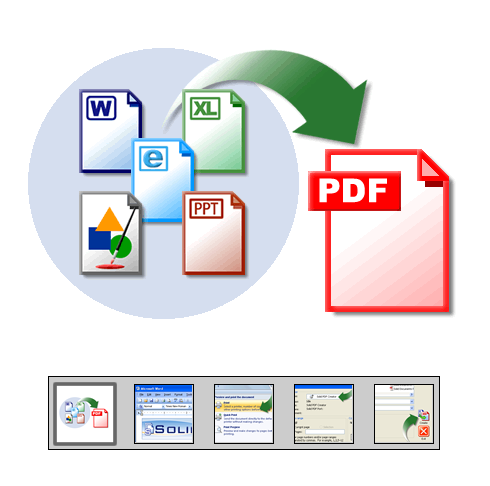
PDF to PDF/A Conversion: Transform existing standard or image-based PDF files into fully searchable, ISO 19005-compliant archival documents .
Scan to PDF/A: Convert paper documents directly into archival-quality PDF/A files using built-in OCR technology to create searchable text layers .
TIFF to PDF/A Conversion: Transform legacy scanned TIFF images into searchable, archivable PDF/A documents, preserving valuable historical information .
PDF/A Validation and Repair: Verify document compliance with ISO standards and automatically fix common issues that might prevent successful archiving .
OCR for Searchability: Add searchable text layers to scanned documents, enabling full-text searching and indexing for improved document retrieval .
Feature Deep Dive: What Solid PDF/A Express Offers
PDF/A Conversion and Creation
At its heart, Solid PDF/A Express excels at converting various input formats into PDF/A-compliant documents. The software handles the complexities of the conversion process automatically—embedding fonts, managing color spaces, ensuring metadata compliance, and making structural adjustments required by the archival standard .
The conversion process preserves the visual appearance and layout of original documents while adding the technical elements needed for long-term preservation. This means a document converted today will look identical decades from now, regardless of changes in operating systems or software applications.
Document Scanning and OCR Integration
One of the software’s most practical features is its ability to convert physical documents into archival digital files . Using integrated OCR technology, Solid PDF/A Express can process scanned paper documents and create searchable text layers. This functionality enables organizations to digitize paper archives while ensuring the resulting files remain fully searchable and compliant with preservation standards .
The OCR capability extends to converting legacy scanned TIFF files, allowing organizations to modernize their document archives without recreating content manually.
Validation and Compliance Verification
Creating a PDF/A file is only half the equation; ensuring it meets archival standards is equally important. Solid PDF/A Express includes validation features that check document compliance with ISO 19005 specifications . The software can identify non-compliant elements and repair common issues automatically, providing users with confidence that their documents meet archival requirements.
Document Manipulation Tools
Beyond conversion and validation, the software offers practical document management features:
Merge and Combine: Combine multiple documents into a single PDF file, simplifying document management .
Page Manipulation: Rearrange, extract, or insert pages within PDF files using an intuitive drag-and-drop interface .
Batch Processing: Perform multiple-file conversions simultaneously to save time and improve productivity .
Security Features
Document security is a critical concern for archival systems. Solid PDF/A Express provides robust security features:
Password Protection: Restrict who can read, edit, copy, or print documents .
Permissions Management: Control specific user actions on protected documents.
Encryption: Support for up to 256-bit AES encryption, ensuring document confidentiality .
PDF Creation from Various Sources
The software extends beyond PDF/A-specific functionality, offering comprehensive PDF creation capabilities:
Create from Office Documents: Convert Word, Excel, and PowerPoint files to PDF, automatically generating bookmarks from document headings .
Print to PDF: Generate PDF files from any Windows-based program using a virtual printer driver .
Create from Images: Convert JPG, TIF, TIFF, and JPEG images to editable PDF files .
System Requirements and Installation
Operating System Compatibility
Solid PDF/A Express version 9.0 is compatible with a wide range of Windows operating systems, including Windows 10, Windows 8, Windows 7, Windows Vista, and Windows XP . This broad compatibility ensures the software can run on both modern and legacy systems, accommodating organizations with diverse IT environments.
Version 9.2 of the software is also available on Windows 8 64-bit and Windows 7 64-bit, making it compatible with modern 64-bit operating systems .
Minimum and Recommended Hardware
To run Solid PDF/A Express effectively, your system should meet the following specifications:
Minimum Requirements:
- CPU: Intel Pentium 4 (2GHz) or AMD Athlon XP 2800+ (2.2GHz)
- RAM: 512MB
Recommended Requirements:
- CPU: Intel Core 2 Duo E6300 (1.86GHz) or AMD Athlon 64 X2 3800+ (2GHz)
- RAM: 2GB
Additional Requirements
Microsoft Office 2013, 2016, or 2019 is required to create PDF files directly from .doc, .xls, .ppt, and other Office formats . For OCR functionality and scanning features, a compatible scanner or existing digital image files is necessary.
How Solid PDF/A Express Compares to Alternatives
Solid PDF/A Express vs. Professional Tools
Solid PDF/A Express serves as an accessible solution for individual users and small organizations, positioned below enterprise-grade tools like callas pdfaPilot, which offers integration with Adobe Acrobat and specialized workflows for large-scale archiving . Enterprise solutions typically include SDK options and broader automation capabilities but come at significantly higher price points.
Solid PDF/A Express vs. Open-Source and Free Solutions
Several open-source alternatives exist for users comfortable with technical tools:
pdftopdfa: A Python-based library that converts PDFs to PDF/A-2 and PDF/A-3 formats using direct PDF manipulation via QPDF, preserving original content and fonts without requiring Ghostscript .
pdfa-parser: A Python wrapper that uses Ghostscript for PDF/A conversion and VeraPDF for validation, with automatic dependency management .
While these open-source options are free, they require technical expertise to set up and use effectively. Solid PDF/A Express offers a more accessible graphical interface and professional support, making it suitable for non-technical users and businesses that prefer commercial solutions.
Solid PDF/A Express vs. Online PDF/A Converters
Numerous online tools offer PDF/A conversion, but they raise significant security and privacy concerns for sensitive documents. Uploading confidential business documents to unknown servers creates potential data exposure risks. Solid PDF/A Express processes documents locally, ensuring complete control over sensitive information.
Practical Use Cases for Solid PDF/A Express
Small Business Archiving
Small businesses managing increasing volumes of digital documents require affordable, professional archiving solutions. Solid PDF/A Express enables these organizations to convert invoices, contracts, and correspondence into searchable, archival-quality PDFs without investing in expensive enterprise systems.
Legal and Regulatory Compliance
Law firms and regulated businesses must maintain records that meet strict evidentiary standards and compliance requirements. PDF/A documents satisfy many legal and regulatory standards for document preservation , and Solid PDF/A Express provides the validation tools needed to verify compliance.
Converting Legacy Paper Archives
Organizations with extensive paper archives face the challenge of digitizing decades of records. Solid PDF/A Express’s scanning and OCR capabilities enable systematic conversion of paper documents to searchable digital archives, reducing physical storage requirements while improving searchability.
Financial Document Management
Financial institutions and accounting firms handling sensitive client documents benefit from the software’s security features, including password protection and encryption. These capabilities protect confidential information while maintaining archival compliance.
Office Productivity
Beyond archiving-specific needs, Solid PDF/A Express serves as a comprehensive PDF productivity tool. Users can create PDFs from Office documents, combine multiple documents, and apply basic edits, reducing the need for multiple separate applications.
Getting Started with Solid PDF/A Express
Download and Installation
The software is available as a free trial download from various platforms . Installation is straightforward on compatible Windows systems, requiring minimal technical expertise.
Trial vs. Full Version
Users can download a trial version to evaluate the software before purchasing. After purchase, users receive an unlock password via email to remove trial restrictions and access full functionality .
First-Time User Guide
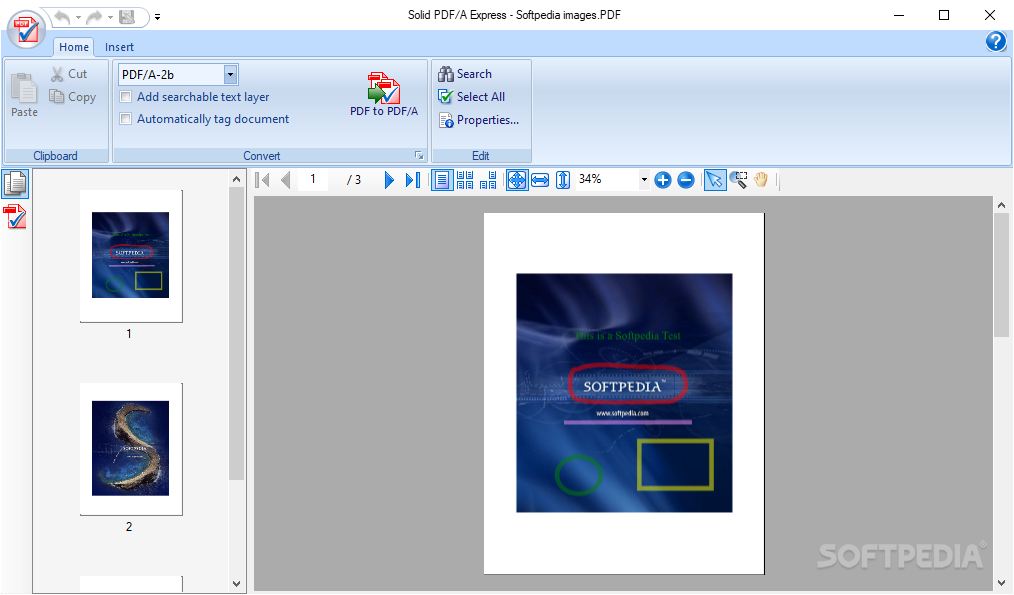
Upon first launch, Solid PDF/A Express presents a start screen offering several options: Open PDF, PDF to PDF/A, Create PDF, and Combine Files into PDF . The intuitive ribbon interface organizes all functions in clearly labeled tabs, making navigation accessible for users at all skill levels.
Standard Workflow Examples
Converting an Existing PDF to PDF/A:
- Launch Solid PDF/A Express
- Select “PDF to PDF/A” from the start screen
- Choose the source PDF file
- Select the desired PDF/A version (e.g., PDF/A-1b, PDF/A-2b)
- Click convert and save the new archival file
Scanning a Paper Document to PDF/A:
- Connect a scanner to the computer
- Select “Scan to PDF” from the interface
- Configure scanning options (resolution, color, etc.)
- Choose PDF/A output format
- Start scanning—OCR will automatically create searchable text
Frequently Asked Questions
1. What PDF/A versions does Solid PDF/A Express support?
Solid PDF/A Express supports the complete range of PDF/A standards, including PDF/A-1b (basic compliance with ISO 19005-1), PDF/A-2b and PDF/A-2u (ISO 19005-2), as well as PDF/A-3b and PDF/A-3u . The “u” versions support unicode, which is important for documents requiring character encoding beyond basic Latin scripts.
2. What are the system requirements for Solid PDF/A Express?
The software requires Windows XP, Vista, 7, 8, or 10 . Minimum hardware includes an Intel Pentium 4 (2GHz) or AMD Athlon XP 2800+ (2.2GHz) processor and 512MB RAM, with 2GB RAM recommended for optimal performance. Microsoft Office 2013, 2016, or 2019 is required for creating PDFs from Office documents .
3. Can Solid PDF/A Express convert scanned documents into searchable PDFs?
Yes, Solid PDF/A Express includes built-in OCR technology that can process scanned documents and scanned TIFF images, adding searchable text layers . This functionality enables full-text searching of documents that originated as paper records, making them much more usable for future reference.
4. Does Solid PDF/A Express include PDF/A validation features?
Yes, the software includes PDF/A validation features that check existing PDF files for compliance with ISO 19005 standards. The validation process identifies issues that might prevent successful archiving and includes tools to repair common problems . It also generates standard compliance reports documenting the validation results.
5. How much does Solid PDF/A Express cost?
Pricing is available upon purchase, with a single-user license offering access to the complete feature set. A free trial version is available for evaluation, allowing users to test the software before committing to a purchase . The software comes with a 90-day money-back guarantee for customer satisfaction .
Conclusion
Solid PDF/A Express for Windows provides a professional, accessible solution for organizations and individuals needing reliable PDF/A document archiving capabilities. Its comprehensive feature set—encompassing conversion, validation, OCR, document manipulation, and security—addresses the core requirements of long-term document preservation.
The software’s ability to handle PDF/A-1 through PDF/A-3 standards, combined with support for scanning, image conversion, and batch processing, makes it suitable for diverse use cases, from small business archiving to regulatory compliance. The intuitive interface reduces the learning curve, allowing users to focus on document preservation rather than technical complexities.
While the software may not match the advanced automation capabilities of enterprise solutions , and is not as cost-free as technical open-source alternatives , Solid PDF/A Express offers a practical middle ground. It delivers professional-grade features through a user-friendly interface, with pricing accessible to small businesses and individual professionals.
For those serious about preserving their digital documents for the long term, Solid PDF/A Express offers a capable, well-supported solution that simplifies the process of creating and validating ISO-compliant archival documents. Its commitment to the PDF/A standard and continuous updates ensures that documents converted today will remain accessible and reliable for future users, providing peace of mind in an increasingly digital world.



