Dropbox Java SDK – Developer’s Cloud Storage Integration
Introduction
In the modern software development landscape, cloud storage integration has become a fundamental requirement for countless applications. Whether you’re building a file backup solution, a collaborative document editor, or a content management system, the ability to seamlessly interact with cloud storage services is invaluable. Dropbox, with its robust API and extensive developer ecosystem, offers a powerful platform for such integrations.
The Dropbox Java SDK is the official toolkit that bridges the gap between Java applications and Dropbox’s cloud storage infrastructure. This comprehensive guide explores everything you need to know about the Dropbox Java SDK—from setup and installation to advanced implementation strategies. Whether you’re a seasoned developer or just starting with cloud integration, this article will equip you with the knowledge to leverage Dropbox’s capabilities within your Java applications.
Understanding the Dropbox Java SDK
What is the Dropbox Java SDK?
The Dropbox Java SDK is a Java library designed to provide seamless access to Dropbox’s HTTP-based Core API v2 . It serves as an abstraction layer, simplifying the complexities of making HTTP requests, handling authentication, and managing data serialization. Essentially, it allows Java developers to interact with Dropbox’s services as if they were native Java operations rather than remote API calls.
Key Features and Capabilities
The SDK offers a comprehensive set of features that enable developers to build powerful cloud-integrated applications. The library provides support for basic file operations, including uploading, downloading, deleting, and moving files and folders . Beyond these fundamentals, it encompasses advanced management capabilities for file properties, sharing permissions, metadata handling, and folder structures .
The SDK also integrates Dropbox Paper functionality, enabling document and folder management within the Dropbox Paper workspace . For enterprise applications, the SDK supports team-specific operations, team log events, and team policy management . This makes it suitable for both individual developer projects and large-scale enterprise solutions.
Technical Specifications and Requirements
Java Version Compatibility
The Dropbox Java SDK is designed to work with modern Java environments. The current release of the SDK supports Java 8 and above, making it compatible with a wide range of Java applications, from legacy enterprise systems to modern microservices . For Android developers, the SDK supports Android 8+ (API level 26 and above) .
Licensing
The Dropbox Java SDK is released under the MIT License, which is a permissive open-source license . This licensing model allows developers to use, modify, and distribute the SDK in both open-source and proprietary projects with minimal restrictions.
API Version Support
The SDK primarily targets Dropbox’s Core API v2, which is the current and recommended version of the Dropbox API . While the SDK does provide some support for the older Core API v1, this support is deprecated and scheduled for removal . Developers are strongly encouraged to use API v2 for all new projects and plan migrations for existing projects.
Setting Up the Dropbox Java SDK
Maven Configuration
For developers using Maven, integrating the Dropbox Java SDK is straightforward. You need to add the following dependency to your project’s pom.xml file within the <dependencies> section :
<dependency>
    <groupId>com.dropbox.core</groupId>
    <artifactId>dropbox-core-sdk</artifactId>
    <version>7.0.0</version>
</dependency>
Gradle Configuration
For Gradle users, the dependency is added to the dependencies block in your project’s build.gradle file :
dependencies {
    implementation 'com.dropbox.core:dropbox-core-sdk:7.0.0'
}
Manual JAR Download
Alternatively, developers can download the Java SDK JAR file and its dependencies directly from the latest release page . It’s important to note that the distribution artifacts available on the releases pages do not contain optional dependencies, so you may need to add those manually if required .
Getting Started: A Step-by-Step Tutorial
Step 1: Register a Dropbox API App
Before you can use the Dropbox API, you must register a new application in the Dropbox App Console . During registration, you’ll select the type of app (Dropbox API app) and choose your app’s permission scope. This app will generate an app key and secret that you’ll use to authenticate your application .
For testing purposes, you can generate an access token for your own account directly through the App Console . This is a quick way to get started without implementing the full OAuth flow for initial testing.
Step 2: Initialize the Dropbox Client
The core of the SDK is the DbxClientV2 class. To create an instance, you’ll need to configure a DbxRequestConfig object and provide an access token :
import com.dropbox.core.DbxException;
import com.dropbox.core.DbxRequestConfig;
import com.dropbox.core.v2.DbxClientV2;

public class Main {
    private static final String ACCESS_TOKEN = "YOUR_ACCESS_TOKEN_HERE";

    public static void main(String[] args) throws DbxException {
        // Create Dropbox client
        DbxRequestConfig config = DbxRequestConfig.newBuilder("dropbox/java-tutorial").build();
        DbxClientV2 client = new DbxClientV2(config, ACCESS_TOKEN);

        // Your code here
    }
}
Step 3: Test Account Connection
It’s a good practice to verify that your client is connected to the correct account. You can retrieve the current account information :
// Get current account info
FullAccount account = client.users().getCurrentAccount();
System.out.println("Logged in as: " + account.getName().getDisplayName());
Step 4: List Folder Contents
One of the most common operations is listing the contents of a Dropbox folder :
// Get files and folder metadata from Dropbox root directory
ListFolderResult result = client.files().listFolder("");
while (true) {
    for (Metadata metadata : result.getEntries()) {
        System.out.println(metadata.getPathLower());
    }

    if (!result.getHasMore()) {
        break;
    }

    result = client.files().listFolderContinue(result.getCursor());
}
Step 5: Upload a File
Uploading files is another fundamental operation. The SDK provides a builder pattern for configuring upload options :
// Upload "test.txt" to Dropbox root directory
try (InputStream in = new FileInputStream("test.txt")) {
    FileMetadata metadata = client.files().uploadBuilder("/test.txt")
        .uploadAndFinish(in);
    System.out.println("Uploaded file: " + metadata.getName());
}
Core Functionalities in Detail
File Operations
Uploading Files
The SDK supports both standard and chunked file uploads . Chunked uploads are particularly useful for large files, allowing the upload to be resumed if interrupted . The UploadBuilder class provides a flexible API for configuring upload parameters .
Downloading Files
Downloading files is as straightforward as uploading. You can download files to an OutputStream for further processing :
try (OutputStream outputStream = new FileOutputStream("downloaded_file.txt")) {
    client.files().downloadBuilder("/path/to/file.txt")
        .download(outputStream);
}
Creating and Managing Folders
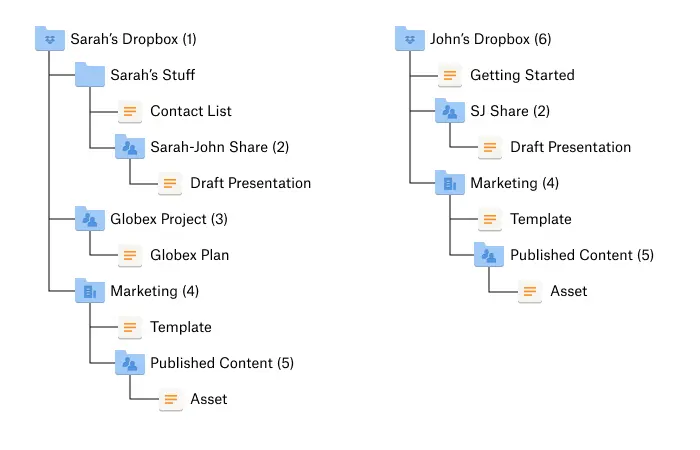
Folders can be created programmatically, and the SDK provides methods for checking the existence of folders and creating nested directory structures :
FolderMetadata folder = client.files().createFolderV2("/New Folder")
    .getMetadata();
System.out.println("Created folder: " + folder.getName());
Deleting Files and Folders
Deletion operations are supported for both files and folders. The SDK allows for permanent deletion or moving items to the trash :
client.files().deleteV2("/path/to/file.txt");
System.out.println("Deleted successfully");
Moving and Copying
The SDK provides methods for moving and copying files and folders between different paths within the Dropbox account.
Advanced Metadata and File Properties
Managing Metadata
The SDK allows developers to work with file and folder metadata, including custom properties and tags . This is useful for applications that require additional information to be associated with stored files.
File Requests and Sharing
For applications that need to collect files from external users, the SDK provides endpoints for creating and managing file requests . This enables functionality similar to Dropbox’s file request feature.
Shared Links
Creating and managing shared links is also supported through the SDK’s sharing namespace . This allows applications to generate shareable URLs for files and folders.
Team and Enterprise Features
Team Management
For Dropbox Business accounts, the SDK provides extensive team management capabilities, including user management, team policies, and team event logs . These endpoints are accessible through the DbxTeamClientV2 class.
Team Logging
The SDK includes comprehensive team logging functionality through the teamlog namespace . This enables applications to audit team activities and generate reports on user actions.
Team Selective Sync
The SDK provides methods for managing team selective sync configurations, allowing administrators to control which folders are synced to team member devices .
Authentication and Authorization
OAuth 2.0 Flow
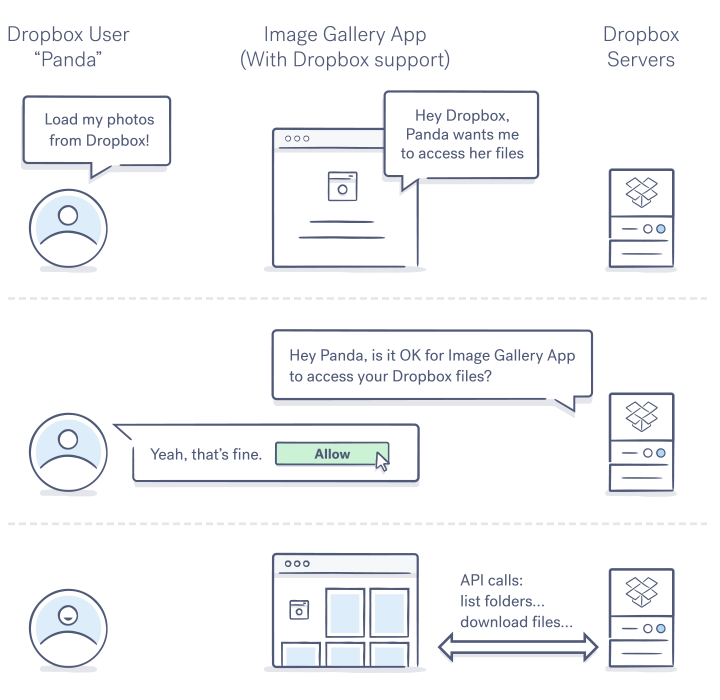
The Dropbox Java SDK supports the full OAuth 2.0 authorization flow for applications that need to access user accounts . This flow involves redirecting the user to Dropbox for authorization and then receiving an authorization code that can be exchanged for an access token.
Implementing OAuth 2.0
The SDK provides convenience classes for implementing OAuth :
DbxAppInfo appInfo = new DbxAppInfo(APP_KEY, APP_SECRET);
DbxWebAuth webAuth = new DbxWebAuth(config, appInfo);
DbxWebAuth.Request authRequest = DbxWebAuth.newRequestBuilder()
    .withNoRedirect()
    .build();

String authorizeUrl = webAuth.authorize(authRequest);
System.out.println("1. Go to: " + authorizeUrl);
System.out.println("2. Click \"Allow\"");
System.out.println("3. Copy the authorization code");

String code = new Scanner(System.in).nextLine().trim();
DbxAuthFinish authFinish = webAuth.finishFromCode(code);
String accessToken = authFinish.getAccessToken();
App-Only Authentication
For applications that need to interact with a single Dropbox account (like a backup service for an organization), the SDK provides app-only authentication . This is implemented through the DbxAppClientV2 class, which uses the app key and secret directly without requiring user interaction .
DbxAppClientV2 appClient = new DbxAppClientV2(
    config,
    APP_KEY,
    APP_SECRET
);
Android-Specific Authentication
The SDK includes special support for Android applications . When the official Dropbox app is installed on the device, the SDK can use it for authentication, providing a more seamless user experience. If the app isn’t installed, the SDK falls back to a web-based flow .
Platform-Specific Considerations
Desktop Java Applications
For standard desktop Java applications, the SDK works seamlessly out of the box. Developers should ensure they handle DbxException exceptions appropriately and manage file I/O operations carefully.
Android Applications
The SDK includes specific support for Android development . Key considerations include:
- AndroidManifest.xml Configuration: The SDK requires specific entries in the Android manifest for proper authentication handling .
- Kotlin Compatibility: The Android code in the SDK is written in Kotlin, and the Kotlin standard library is required as a runtime dependency .
- ProGuard Rules: Developers using ProGuard may need to add specific rules to avoid warnings .
- Jetpack Compose Issues: For projects using Jetpack Compose, developers may need to add the
android.jetifier.ignorelistproperty to avoid transformation errors .
Web Applications
The SDK includes an example web file browser application that demonstrates how to use the SDK in a web context . This serves as a template for building web-based Dropbox integration.
Best Practices and Error Handling
Exception Handling
The SDK throws DbxException for API errors. It’s recommended to wrap all SDK calls in try-catch blocks to handle these exceptions gracefully :
try {
    // Dropbox API call here
    client.files().deleteV2("/test.txt");
} catch (DbxException ex) {
    System.err.println("Error: " + ex.getMessage());
}
Rate Limiting
The Dropbox API enforces rate limits, and the SDK provides methods for handling these limits . Implementing exponential backoff for retries is a recommended practice.
Resource Management
The SDK’s UploadUploader and Downloader classes implement AutoCloseable and should be closed properly to prevent resource leaks :
try (UploadUploader uploader = client.files().uploadBuilder("/file.txt").start()) {
    // Upload operations
} catch (Exception e) {
    // Handle error
}
Security Best Practices
The SDK uses OAuth 2.0 for authentication, ensuring secure access to user accounts . Developers should:
- Store access tokens securely (encrypted in production)
- Use the principle of least privilege when requesting permissions
- Never hardcode sensitive credentials in source code
- Keep the SDK updated to the latest version for security patches
SDK Version Updates
It’s crucial to keep the SDK updated . The Dropbox API occasionally undergoes changes that may require SDK updates for continued compatibility. Using the latest version ensures you have access to the newest features and security updates .
Frequently Asked Questions
1. What are the system requirements for using the Dropbox Java SDK?
The Dropbox Java SDK requires Java 8 or higher for standard Java applications. For Android development, it requires Android 8+ (API level 26+). The SDK works across Windows, macOS, and Linux operating systems. The recommended version as of this writing is 7.0.0 .
2. How do I obtain an access token for testing with the Dropbox Java SDK?
You can generate an access token for your own Dropbox account through the Dropbox App Console. After creating a new app in the console, navigate to the app’s settings page and look for the “Generated access token” section. Click the “Generate” button to create a token for testing purposes .
3. Can the Dropbox Java SDK be used for Android app development?
Yes, the Dropbox Java SDK supports Android app development. The SDK includes Android-specific components and works with Android 8+ (API level 26+). The SDK also includes support for Kotlin and can be used with the official Dropbox Android app for authentication. Additional configuration in the AndroidManifest.xml is required for proper authentication handling .
4. Does the Dropbox Java SDK support the full OAuth 2.0 flow?
Yes, the SDK fully supports OAuth 2.0 authorization. It includes classes like DbxWebAuth that implement the complete OAuth flow, including obtaining authorization codes, exchanging them for access tokens, and handling refresh tokens. The SDK also provides support for app-only authentication using the DbxAppClientV2 class for scenarios that don’t require user interaction .
5. What is the difference between API v1 and API v2 in the Dropbox Java SDK?
The Dropbox Core API v2 is the current version of the API, while API v1 is deprecated and scheduled for removal. The Java SDK primarily supports API v2, though some support for API v1 exists but is also deprecated. All new projects should use API v2, and existing projects using API v1 should be migrated. The SDK 7.0.0 version focuses on the latest API features .
Conclusion
The Dropbox Java SDK represents a mature and feature-rich solution for integrating Dropbox cloud storage capabilities into Java applications. With its comprehensive support for file operations, authentication, team management, and platform-specific optimizations, the SDK provides developers with the tools they need to build sophisticated cloud-integrated applications.
The SDK’s MIT license makes it accessible for both open-source and proprietary projects, while the active development and strong community support ensure that the SDK remains up-to-date with the latest Dropbox API features. The clear documentation, tutorial examples, and comprehensive API reference facilitate a smooth learning curve for developers at all experience levels.
As cloud storage integration becomes increasingly essential in modern application development, the Dropbox Java SDK stands out as a reliable and well-supported solution. Whether you’re building a mobile app, a desktop application, or an enterprise system, the SDK provides the foundation for efficient and secure Dropbox integration.
For developers looking to enhance their applications with cloud storage capabilities, investing time in mastering the Dropbox Java SDK offers significant returns. The SDK’s combination of power, flexibility, and ease of use makes it a valuable addition to any Java developer’s toolkit. As Dropbox continues to evolve its platform, the SDK ensures that developers can leverage the latest capabilities while maintaining compatibility with existing codebases.



