Able MIDI Editor- Create Professional-Grade Music Without a Keyboard
SEO Meta Description
Explore the Able MIDI Editor for Windows. Compose melodies, create ringtones, and arrange full tracks with an intuitive piano roll interface. Free trial available!
Introduction
Have you ever wanted to create your own music, ringtones, or melodies but felt intimidated by the complexity of professional music production software? Or perhaps you have musical ideas but don’t play a traditional instrument? The Able MIDI Editor bridges this gap, offering a powerful yet accessible tool for music creation without requiring a physical keyboard.
This Windows-based software provides a piano roll interface that makes MIDI editing intuitive for both beginners and experienced musicians. Whether you’re looking to compose simple ringtones, craft catchy melodies, or arrange full musical arrangements, Able MIDI Editor offers the features you need at an affordable price point.
While the software has a learning curve—as many user reviews point out—it rewards those who invest time in understanding its capabilities with professional-grade MIDI editing functionality. Let’s explore what this tool offers and how it can unlock your musical creativity.
What Is MIDI and Why Use It?
Understanding MIDI Technology
MIDI, which stands for Musical Instrument Digital Interface, is a technical standard that allows electronic musical instruments, computers, and other devices to communicate with each other. Unlike audio recordings that capture sound waves, MIDI files contain instructions: which notes to play, how loud they should be, how long they should last, and other performance data.
Think of MIDI as the sheet music of the digital world. The file tells your computer or synthesizer what to play, but the actual sound comes from your playback device. This makes MIDI files incredibly versatile—the same file can sound like a grand piano on one system and an electric guitar on another.
Why Create MIDI Files?
MIDI files offer several advantages:
- Small File Size: MIDI files are tiny compared to audio recordings, making them ideal for ringtones and mobile applications
- Editability: Every note can be individually adjusted, making them perfect for composition
- Flexibility: Change instruments, tempo, or key without re-recording
- Compatibility: Play on virtually any device with MIDI support
What Is Able MIDI Editor?
A Versatile MIDI Composition Tool
Able MIDI Editor is a Windows-based software application designed for creating and editing MIDI files. It provides a visual interface for composing music without needing a physical MIDI keyboard or extensive musical training.
The software’s approachable design makes it suitable for various use cases, from creating custom ringtones to composing complete musical arrangements. While it’s not as feature-rich as professional digital audio workstations (DAWs) like Logic Pro or Ableton Live, it offers a focused set of tools for MIDI composition at a fraction of the cost.
Key Features
- Piano Roll Interface: An intuitive visual editor where notes are displayed as bars on a grid, making it easy to draw, move, and modify notes
- Tapping Tool: Create bar-line arrangements manually or by tapping along to a beat, making it accessible for non-musicians
- Advanced Track Grouping: Organize multiple tracks for complex arrangements
- Note Rearrangement: Easily move, copy, or transform note patterns
- Ringtones and Melodies: Create custom ringtones for mobile phones
- Full Arrangements: Compose complete musical pieces with multiple instrument tracks
Getting Started with Able MIDI Editor
Installation and Setup
- Download: Visit a trusted source like CNET Download to obtain the installer
- Install: Run the installation file and follow the on-screen instructions
- Launch: Open Able MIDI Editor from your Start menu or desktop shortcut
Understanding the Interface
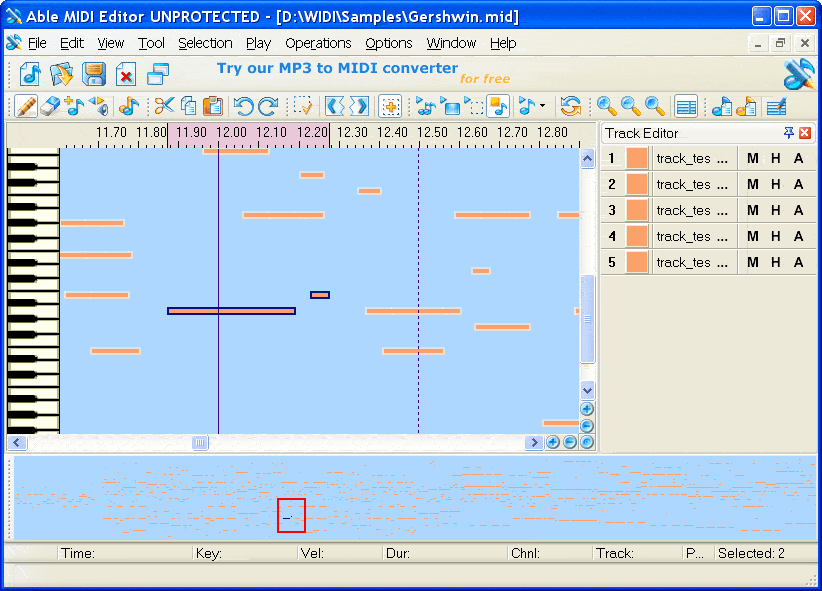
The piano roll interface is central to the Able MIDI Editor experience. Here’s how it works:
- Vertical Axis: Represents different notes (pitches)
- Horizontal Axis: Represents time (left to right)
- Note Bars: Visual representations of notes; their position determines pitch, and their length determines duration
This visual approach makes MIDI editing more intuitive than writing code or using text-based interfaces. You can literally “paint” your music onto the canvas.
Creating Your First Project
Step 1: Starting a New Project
When you launch Able MIDI Editor, you’ll be presented with a blank workspace. Begin by:
- Setting the tempo (speed) of your piece
- Selecting the initial instrument or sound
- Choosing the key or scale if you want to work within musical constraints
Step 2: Adding Notes
Using the piano roll interface:
- Click on the grid to add notes at specific pitches and times
- Drag notes to adjust their duration
- Click and drag existing notes to reposition them
Step 3: Using the Tapping Tool
For those without formal musical training, the Tapping Tool is invaluable:
- Play a rhythm by tapping along to a beat
- The software automatically places notes on the bar lines
- Adjust the pitches manually after creating the rhythm
Step 4: Building a Composition
As you become comfortable, you can add multiple tracks:
- Layer different instruments
- Create basslines, melodies, and harmonies
- Use track grouping to organize complex arrangements
Step 5: Saving and Exporting
Once your composition is complete:
- Save your project file for future editing
- Export as a MIDI file for use in other applications
- Export as a ringtone or other format as needed
Tips for Beginners
Overcoming the Learning Curve
User reviews consistently mention that Able MIDI Editor has a steep learning curve, especially for those new to music creation. Here are strategies to make your journey easier:
- Start Simple: Begin with single-track melodies before attempting complex arrangements
- Learn the Piano Roll: Understand how notes relate to the piano layout
- Use the Tapping Tool: Let the software help you create rhythms initially
- Watch Tutorials: Seek out video tutorials for visual guidance
- Reference Existing MIDI Files: Load existing files to see how they’re structured
- Practice Regularly: Like any creative tool, proficiency comes with practice
When to Look Elsewhere
As one reviewer noted, if your only goal is to shorten MIDI files for ringtones without creativity, this software might be more complex than you need. Consider simpler tools if your needs are minimal. However, for anyone wanting to explore music creation, the learning investment pays off.
Important Considerations
Trial Version Limitations
Several users have noted that the trial version of Able MIDI Editor does not allow saving files. This can make it difficult to truly evaluate the software’s capabilities before purchasing. If you’re considering the software:
- Use the trial to learn the interface and features
- Test all functionality you might need
- Be prepared to purchase if you want to save your work
Value Proposition
Able MIDI Editor positions itself as an inexpensive option for MIDI editing compared to professional alternatives. While it lacks the advanced features of full DAWs, it provides focused functionality for MIDI composition at a significantly lower cost.
Alternatives to Consider
If You Need Simpler MIDI Tools
For users who found Able MIDI Editor too complex or limited:
- MIDI Maker 1.01: Mentioned in user reviews as a simpler alternative for creating MIDI files
- Online MIDI Editors: Web-based tools that require no installation
- Basic Text Editors: Some simple MIDI can be created with text-based tools
If You Need More Advanced Features
For professional music production:
- Logic Pro (Mac): Professional DAW with comprehensive MIDI and audio capabilities
- Ableton Live: Popular for electronic music production
- FL Studio: Known for its piano roll and beat-making capabilities
- Reaper: Affordable professional DAW with a generous trial
Frequently Asked Questions (FAQs)
1. What is Able MIDI Editor?
Able MIDI Editor is a Windows software application for creating and editing MIDI files. It features a piano roll interface for composing music without requiring a physical MIDI keyboard.
2. Is Able MIDI Editor free?
Able MIDI Editor offers a free trial version, but it has limitations—users report that the trial does not allow saving files. The full version requires purchase for saving and exporting functionality.
3. Can I create ringtones with Able MIDI Editor?
Yes, Able MIDI Editor is well-suited for creating custom ringtones. Its features allow you to compose melodies and export them in formats compatible with mobile phones.
4. Do I need to play an instrument to use Able MIDI Editor?
No, you don’t need to play an instrument. The Tapping Tool allows you to create rhythms by tapping, and the piano roll interface lets you place notes visually, making it accessible to non-musicians.
5. What are the system requirements for Able MIDI Editor?
Able MIDI Editor runs on Windows systems, including Windows 10, Windows XP, Windows 2000, Windows NT, Windows 98, and Windows ME. It has minimal hardware requirements.
Conclusion
Able MIDI Editor offers a compelling entry point into the world of MIDI music creation. While it presents a learning curve—particularly for those new to music production—it rewards persistent users with the ability to compose melodies, create ringtones, and arrange full musical pieces without needing a physical instrument.
The software’s piano roll interface and Tapping Tool democratize music creation, making it accessible to people who might otherwise never compose a note. At an affordable price point, it fills an important niche between simple ringtone makers and professional digital audio workstations.
As with any creative tool, your success with Able MIDI Editor depends on your willingness to learn and experiment. The learning curve is not an obstacle but an invitation to develop new skills. For those ready to explore the world of digital music creation, Able MIDI Editor provides a solid foundation on which to build.
Whether you’re creating a personal ringtone, composing for a project, or exploring music creation for the first time, give Able MIDI Editor a try—and start making music today!



