
Winsent Net Send SDK – To NetBIOS Messaging Development
Introduction
In the early days of Windows networking, before the rise of instant messaging apps and team collaboration platforms, there was a simple yet effective way to send messages across a network. The net send command, part of the NetBIOS/SMB protocol stack, allowed users to send short text messages to other computers on the same network. It was a straightforward tool for quick communication in office environments, especially when email was not yet ubiquitous, and phone calls were too formal for simple queries.
While the original net send command was deprecated in modern versions of Windows, its underlying technology remains accessible to developers through specialized software development kits (SDKs). The Winsent Net Send SDK is one such tool, providing developers with the ability to create applications that can send and receive messages using the same NetBIOS/SMB protocol stack that powered the classic net send and WinPopup features [citation:URL].
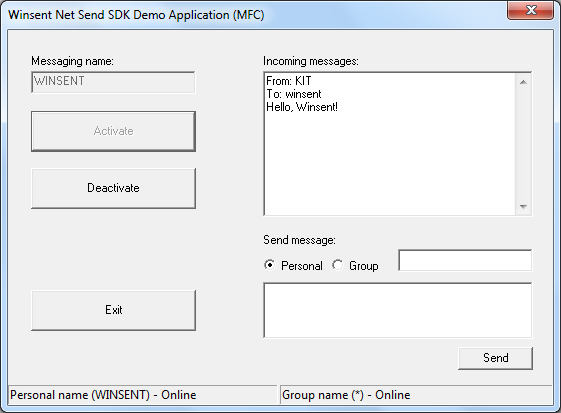
This article explores the Winsent Net Send SDK, examining its features, architecture, and use cases. We’ll delve into the technology behind NetBIOS messaging, discuss how developers can leverage the SDK to build custom messaging applications, and consider its place in the modern software development landscape. Whether you’re a developer looking to add network messaging capabilities to your application or simply curious about how these classic networking technologies work, this guide provides a comprehensive overview.
Understanding NetBIOS and SMB: The Foundation of Windows Messaging
What is NetBIOS?
NetBIOS, which stands for Network Basic Input/Output System, is a programming interface that allows applications on separate computers to communicate over a local area network (LAN). Originally developed by Sytek Inc. for IBM in the 1980s, NetBIOS became a foundational technology for early Windows networking.
NetBIOS provides several essential services:
- Name service: NetBIOS computers on a network have unique names (up to 16 characters), and the name service allows them to register, discover, and resolve these names.
- Session service: This establishes and maintains connections between two NetBIOS names, enabling reliable, two-way communication.
- Datagram service: This allows for sending and receiving datagrams (messages) to or from a specific NetBIOS name, supporting both broadcast and directed communication.
The SMB Protocol and Windows Messaging
Server Message Block (SMB) is a network file-sharing protocol that operates on top of NetBIOS. It’s the foundation of file and printer sharing in Windows environments. However, SMB also includes messaging capabilities. The net send command and WinPopup functionality are built on top of the SMB messaging layer.
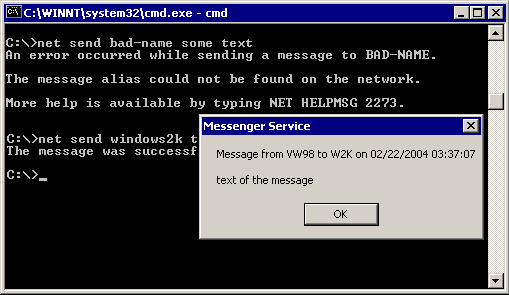
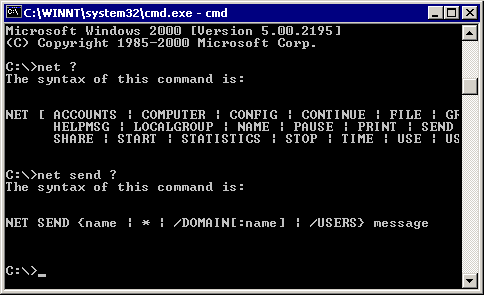
The classic net send command syntax was simple:
net send computername "Your message here"This command sent a popup message to the specified computer, which would appear on the recipient’s screen. While simple, this system had several limitations. It required the target computer to be running the Messenger service, a component that was often disabled for security reasons. It also lacked features like message history, contact lists, and advanced formatting. However, for its time, it represented a significant step forward in network-based communication.
Why NetBIOS Messaging Was Deprecated
Microsoft deprecated the net send command and the Messenger service starting with Windows Vista. This decision was primarily motivated by security concerns. The Messenger service was a frequent target for malicious actors who used it to send spam and phishing messages directly to users’ desktops. Additionally, the service ran with high privileges, making it a potential vector for more serious attacks.
Despite its deprecation, the underlying NetBIOS/SMB messaging capabilities are still present in modern Windows versions. The Winsent Net Send SDK leverages this existing functionality, providing a way for developers to build applications that utilize these messaging features.
Winsent Net Send SDK: An Overview
What Is the Winsent Net Send SDK?
The Winsent Net Send SDK is a software development kit designed to help developers build applications with NetBIOS messaging capabilities. The SDK provides a dynamic link library (DLL) that exposes a set of messaging functions, along with header files and sample programs written in multiple programming languages including C++, Delphi, and C# [citation:URL].
The key features of the SDK include:
- NetBIOS/SMB Protocol Support: The SDK uses the NetBIOS/SMB protocol stack, ensuring compatibility with the classic Windows messaging infrastructure.
- Compatibility with Net Send and WinPopup: Messages sent using the SDK are compatible with the traditional
net sendcommand and the WinPopup application, allowing for interoperability with older systems. - Personal and Group Messaging: The SDK supports both one-to-one messaging and group messaging [citation:URL].
- Modern Windows Support: The SDK is designed to work on modern Windows operating systems, including Windows 10, 8, 7, Vista, and Server editions [citation:URL].
- Multi-Language Sample Programs: The SDK includes sample programs written in C++, Delphi, and C# [citation:URL].
Who Is the SDK For?
The Winsent Net Send SDK is primarily designed for developers who need to integrate network messaging capabilities into their applications. Potential use cases include:
- Legacy System Integration: Organizations that still rely on NetBIOS-based messaging for certain workflows can use the SDK to build modern applications that interface with these legacy systems.
- Network Monitoring Tools: Developers building network monitoring or alerting applications might use the SDK to send notifications to administrators or specific workstations.
- Internal Communication Tools: In environments where a lightweight, LAN-based messaging system is preferred over more complex solutions, the SDK can be used to build custom messaging tools.
- Educational Projects: The SDK can serve as a learning tool for understanding NetBIOS and SMB messaging in a practical context.
Technical Architecture of the Winsent Net Send SDK
The DLL Interface
The SDK is implemented as a dynamic link library (DLL) that provides a set of messaging functions [citation:URL]. A DLL is a library that contains code and data that can be used by more than one program at the same time. By providing the messaging functions as a DLL, the SDK allows developers to easily integrate messaging capabilities into their applications.
The specific functions exported by the DLL are not detailed in the source, but they likely include:
- Functions for sending messages to individual users or groups
- Functions for receiving messages
- Functions for configuring messaging options
- Functions for handling message events
Multi-Language Support
One of the key features of the Winsent Net Send SDK is its support for multiple programming languages. The SDK includes sample programs written in C++, Delphi, and C# [citation:URL]. This broad language support makes the SDK accessible to a wide range of developers, regardless of their preferred programming environment.
The samples provide working examples of how to use the SDK’s functions, serving as both a learning resource and a starting point for new projects. By studying the sample code, developers can quickly understand how to integrate messaging functionality into their applications.
Modern Windows Compatibility
The SDK is designed to work with modern Windows operating systems, including Windows 10, 8, 7, and various Server editions [citation:URL]. This compatibility ensures that applications built with the SDK will run on the systems that organizations are using today.
However, it’s important to note that the SDK relies on the NetBIOS/SMB protocol stack, which, while still present in modern Windows, may have different behavior or limitations compared to older versions. Developers should test their applications thoroughly on the target operating systems.
Using the Winsent Net Send SDK in Practice
Setting Up the SDK
To use the Winsent Net Send SDK, a developer would typically:
- Download the SDK package from the software distribution platform.
- Extract the files from the package, which would include the DLL, header files, and sample programs.
- Reference the DLL in their development project, either by adding it as a reference (in C#) or by linking to it (in C++).
- Include the appropriate header files in their source code.
- Study the sample programs to understand how to use the SDK’s functions.
Sending Messages
Sending a message using the SDK would generally involve:
- Initializing the messaging subsystem: This might involve calling a function to initialize the SDK’s internal state.
- Specifying the recipient: The message recipient would be identified by a computer name or user name.
- Composing the message: The message text would be provided as a string.
- Sending the message: The appropriate SDK function would be called to send the message.
The SDK supports both personal and group messaging [citation:URL]. Personal messages are sent to a specific user or computer, while group messages can be sent to multiple recipients simultaneously.
Receiving Messages
Receiving messages is generally more complex than sending them, as it requires the application to listen for incoming messages. The SDK likely supports:
- Callback functions: The application registers a callback function that is called when a message is received.
- Polling: The application periodically checks for new messages.
- Event handling: The SDK may provide event objects that signal when messages are available.
Error Handling
Any network communication can encounter errors. A robust implementation using the SDK would need to handle common error conditions, such as:
- The recipient computer not being reachable
- The recipient not running the Messenger service
- Network timeouts
- Permission issues
Sample Programs: Learning by Example
The C++ Sample
The C++ sample program included with the SDK demonstrates how to use the messaging functions from a native Windows application. C++ is a powerful language for system-level programming and is well-suited for applications that need to interact closely with Windows networking APIs.
The Delphi Sample
Delphi, a rapid application development environment that uses the Object Pascal language, is included as a supported platform [citation:URL]. Delphi was historically popular for building Windows desktop applications, and its inclusion demonstrates the SDK’s commitment to supporting a variety of development tools.
The C# Sample
C# is a modern, object-oriented programming language that is widely used for Windows and .NET development. The C# sample provides an example of how to use the SDK from a managed application [citation:URL]. This is particularly useful for developers building .NET applications who want to integrate the NetBIOS messaging capabilities without dealing with the complexities of native code interoperation.
Pros and Cons of the Winsent Net Send SDK
Advantages
- NetBIOS/SMB Protocol Compatibility: By using the NetBIOS/SMB protocol stack, the SDK enables compatibility with existing Windows messaging infrastructure and interoperability with classic tools like
net sendand WinPopup . - Multi-Language Support: The SDK includes sample programs in C++, Delphi, and C#, making it accessible to developers across different language backgrounds .
- Modern Windows Support: The SDK is designed to work on current Windows operating systems, including Windows 10 .
- Small Footprint: The SDK appears to be lightweight, with no additional requirements noted .
- Free to Use: The SDK is available as a free download .
Potential Drawbacks
- Reliance on Older Protocol: The SDK relies on the older NetBIOS/SMB protocol stack, which may have limitations or security concerns in modern network environments .
- No Cross-Platform Support: The SDK is designed exclusively for Windows, which may limit its applicability for applications targeting other platforms .
- Limited Documentation: The source does not provide details on the SDK’s documentation, which may affect the ease of implementation for developers .
- Niche Use Case: The messaging capabilities provided by the SDK are relatively niche, and most developers will prefer more modern messaging solutions.
Alternatives to the Winsent Net Send SDK
Modern Messaging Solutions
For most modern applications, more robust and secure messaging solutions are available. These include:
- WebSockets and Real-Time Web Technologies: For web applications, WebSockets and related technologies provide real-time, two-way communication between clients and servers, supporting a wide range of messaging patterns.
- Message Queues: Systems like RabbitMQ, Apache Kafka, and Azure Service Bus provide reliable, scalable messaging infrastructure for distributed applications.
- Microsoft Teams and Slack Integrations: For applications that need to send notifications to users, integration with popular messaging platforms is often more effective than building a custom messaging system.
Using NetBIOS Messaging Without an SDK
For developers who are comfortable working with Windows APIs, it’s possible to access NetBIOS messaging directly through the Windows API. However, this is a much lower-level approach that requires more expertise. The Winsent Net Send SDK abstracts this complexity, providing a simpler interface for developers.
NetBIOS in the Modern Network Environment
Security Considerations
NetBIOS has a long history of security vulnerabilities. Some of the key concerns include:
- Lack of Encryption: NetBIOS messages are sent in plain text, making them susceptible to interception and eavesdropping.
- Authentication Weaknesses: NetBIOS authentication can be vulnerable to spoofing and other attacks.
- Service Exploits: The Messenger service and related components have been targets for exploits in the past.
While modern Windows versions have addressed some of these issues, the underlying NetBIOS protocol remains less secure than modern alternatives. Developers using the Winsent Net Send SDK should be aware of these security considerations and take appropriate precautions, such as:
- Using the SDK only in trusted, isolated network environments.
- Implementing additional security measures (such as message encryption) at the application level.
- Ensuring that the Messenger service is properly configured and secured.
Network Configuration
For NetBIOS messaging to work, the network must be properly configured. This typically includes:
- NetBIOS over TCP/IP: NetBIOS must be enabled over TCP/IP in the network settings.
- Network Discovery: Computers must be able to discover each other on the network.
- Firewall Configuration: Firewalls must allow NetBIOS traffic, typically on ports 137-139.
Frequently Asked Questions
1. What is the Winsent Net Send SDK?
Answer: The Winsent Net Send SDK is a software development kit that allows developers to build applications with NetBIOS messaging capabilities. It provides a dynamic link library (DLL) with messaging functions, header files, and sample programs in C++, Delphi, and C#. The SDK enables applications to send and receive messages using the NetBIOS/SMB protocol stack, which is compatible with the classic net send command and WinPopup functionality [citation:URL].
2. What operating systems does the Winsent Net Send SDK support?
Answer: The Winsent Net Send SDK supports a wide range of Windows operating systems, including Windows 10, Windows 8, Windows 7, Windows Vista, Windows XP, Windows 2000, Windows Server 2003, Windows Server, and Windows 2000 [citation:URL]. This broad compatibility ensures that applications built with the SDK can run on both modern and legacy Windows systems.
3. What programming languages does the SDK support?
Answer: The Winsent Net Send SDK includes sample programs written in C++, Delphi, and C# [citation:URL]. This multi-language support means that developers can integrate the SDK into their applications regardless of their preferred programming language and development environment.
4. What are the main features of the Winsent Net Send SDK?
Answer: The main features of the Winsent Net Send SDK include support for the NetBIOS/SMB protocol stack, compatibility with net send and WinPopup, ability to send personal and group messages, support for receiving messages, and compatibility with modern Windows operating systems . The SDK is implemented as a DLL, making it easy to integrate into applications .
5. What are the limitations of the SDK?
Answer: The SDK relies on the older NetBIOS/SMB protocol stack, which may have security and performance limitations . It is designed exclusively for Windows, with no cross-platform support . Additionally, the source does not provide details about the SDK’s documentation, which may affect ease of implementation for developers .
Conclusion
The Winsent Net Send SDK provides a bridge between the classic NetBIOS messaging system that was a staple of early Windows networking and modern application development. By exposing the messaging capabilities of the NetBIOS/SMB protocol stack through a convenient DLL interface, the SDK enables developers to build applications that can send and receive messages using the same infrastructure that powered the net send command and WinPopup.
For developers working in environments where NetBIOS messaging is still relevant, the SDK offers a practical solution for integrating these capabilities into new applications. Its support for multiple programming languages (C++, Delphi, and C#) and compatibility with modern Windows operating systems makes it a versatile tool.
However, the SDK’s reliance on the older NetBIOS/SMB protocol means that it is best suited for specialized use cases, such as legacy system integration, network monitoring, and internal tools within trusted network environments. For most modern applications, more secure and feature-rich messaging solutions—such as WebSockets, message queues, or integration with collaboration platforms—will be more appropriate.
The Winsent Net Send SDK serves as a reminder of the rich history of Windows networking and the persistence of legacy technologies in certain environments. Understanding how these technologies work can be valuable for developers who need to interact with legacy systems or who are interested in the evolution of network communication. While the SDK may not be at the forefront of modern development, it fulfills a specific niche for those who need to work with NetBIOS messaging in Windows.



